
 Page Builder
  Widgets Bundle
  SiteOrigin CSS
  Installer
 Video Background
2 min read Updated
Video Background adds a video background to Page Builder rows, columns and widgets. The addon sets the video to start on its own. You can use a video from your Media Library, a video file URL, or a YouTube or Vimeo URL. Lower the video opacity to let the background color show through, so text on top stays readable.
View the Video Background demo.
Requirements
- SiteOrigin Premium
- Page Builder by SiteOrigin 2.25.3 or higher
- SiteOrigin Widgets Bundle. At the moment, videos from the Media Library and video file URLs need it. YouTube and Vimeo URLs work without it.
Go to SiteOriginPremium Addons and activate Video Background.
Add a Video Background
The settings are in the Design group of the row, column and widget styles, below Background Image Opacity.
- Row: Edit the row. In the Row Styles sidebar, open Design.
- Column: Edit the row and click a column in the column preview. In the Column 1 Styles sidebar (the number matches the column), open Design.
- Widget: Edit the widget. In the Widget Styles sidebar, open Design.
At first, only Background Video shows. The other settings show after you add a video.
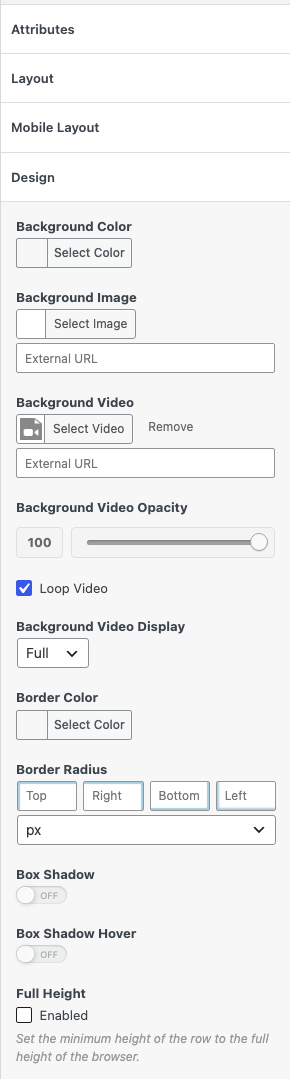
Settings
Background Video
Click Select Video to choose or upload a video in the Media Library. Click Remove to clear it. To use a video from another site, enter its address in the External URL field below. If you set both, the Media Library video plays.
Background Video Opacity
A slider from 0 to 100. Lower values let the Background Color show through the video. At 0, the video doesn’t show. Default: 100.
Loop Video
Plays the video again when it ends. Turn it off to play the video once. YouTube and Vimeo videos always loop. Default: on.
Background Video Display
Full shows the video at the full width of the row, column or widget. Cover makes the video fill the full height as well. Default: Full.
Video Sources
Media Library and video file URLs
The addon plays the file in a video element that is muted, starts on its own and plays inline on phones. Use MP4 (H.264) or WebM files. Most browsers play them. Other formats, such as MOV, OGV, WMV, AVI or MPG, play only in some browsers. The row, column or widget Border Radius also applies to the video.
YouTube and Vimeo
Enter the video page URL, for example https://www.youtube.com/watch?v=VIDEO_ID, in the External URL field. The addon embeds the video and asks the service to start it on its own, muted, and to loop it. This also works for other video services that WordPress can embed.
Tips
- Keep background videos short and small. Large files load slowly, most of all on phones.
- Set a Background Color too. It shows while the video loads.
- The addon has no separate mobile settings. To hide a row or widget on some devices, use Toggle Visibility.