
 Page Builder
  Widgets Bundle
  SiteOrigin CSS
  Installer
 Page builder Full-Width stretched issue


Hi there,
I’ve recently discovered Page Builder – awesome plugin, super intuitive.
Only issue I’m having is this:
I’d like for some of my rows to have a different background colour, which stretches across the whole screen, however when I set the row to Full width Stretched, the row aligns left, and leaves a white margin on the right. As per screenshot below:
Am I missing a setting?
I am using the theme Ultra by Puro.
Thanks for your help!
This is our free support forum. Replies can take several days.
Need fast email support? Get SiteOrigin Premium
Replies
21Hi PSBakh
Sorry to hear about the hassle. Full width stretched should be working without any problems in Ultra. Could you perhaps create a new Administrator account so we can take a look? Instructions below:
Would it be possible for you to create a temporary admin account for us so we can log in and take a look? You can create the account with the following email address:
[email protected]
Just navigate to UsersAdd New in your WordPress admin. Enter siteorigin for the username and [email protected] for the email address. Make sure you’ve selected Administrator for the role and enabled the Send Password field so we receive the details.
Once we’re finished taking a look, you can delete this account. We’ll let you know when to do that.
Hi Andrew,
So sorry for the very late response! I didn’t get an email notification that my question’s been answered.
I’ve sorted the issue by placing the google map widget in the footer.
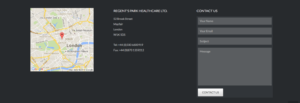
Another thing I was wondering if you could help me with though – you can see on the screenshot, the contact form widget is appearing slightly taller than the map and address on the left hand side – how can I adjust the heights of the entry fields so that the bottom of the send button aligns with the bottom of the google map?
Thank you!
Polina
Sure. Do you have a public URL where we can take a look at what’s going on? If you need to keep this URL private from other users, just select “Private Reply” on the bottom right of the comment box.
Hi Andrew,
Unfortunately I do not have a public URL for the site, but I can create an admin account for you. What details should I use?
Hi PSBakh
Would it be possible for you to create a temporary admin account for us so we can log in and take a look? You can create the account with the following email address:
[email protected]
Just navigate to UsersAdd New in your WordPress admin. Enter siteorigin for the username and [email protected] for the email address. Make sure you’ve selected Administrator for the role and enabled the Send Password field so we receive the details.
Once we’re finished taking a look, you can delete this account. We’ll let you know when to do that.
This is a private message.
This is a private message.
This is a private message.
Hi Andrew,
That’s done for you. You may have a few emails from me in your inbox cus I messed it up a few times, please use the most recent password.
Thank you for your help.
This is a private message.
Awesome, I’m in and testing, thanks. I tested on a row on the home page temporarily and all seemed to be ok. Was there a particular page and row that the problem occurred on?
That row had actually been removed.
The issue I’m having is actually unrelated to the Fullwidth-Stretched problem I originally posted baout.
I was hoping you could help me style the contact form widget so the bottom of it aligns with the bottom of the google map?
Thanks!
Sorry, you did mention that. We can make the textarea small, I just tried and it looks a little out of place and isn’t as functional. Have you tried increasing the height of the map?
New rule at the bottom of Custom CSS sets the textarea height, just for interest sake.
Hi Andrew,
Ideally I’d probably want the map smaller, so that looks great!
What CSS would I use to make the height of the name/email/subject boxes smaller as well?
Super :)
Please, give the following a try:
#colophon input[type="text"], #colophon input[type="email"], #colophon textarea { padding: 4px 5px; }Hey Andrew,
This doesn’t seem to work, also the previous change you made to the textarea height is no longer appearing. I’m not sure what happened – maybe I had the custom css page open at the same time as you and when i saved it overrode the code you added?
Sorry about that
No problem at all. Looks like you’ve managed to sort the problem out. In case you need it again, the CSS is something like:
#colophon input[type="text"], #colophon input[type="email"], #colophon textarea { padding: 4px 5px; } #colophon textarea { height: 55px; }Hi Andrew!
Yes, I’ve managed to sort it out.
Thanks for your help :)
Awesome :) Glad to hear you’ve made progress.
All the best.
This is a private message.
Replies on this thread are closed.
Please create a new thread if you have a question, or purchase a SiteOrigin Premium license if you need one-on-one email support.