
 Page Builder
  Widgets Bundle
  SiteOrigin CSS
  Installer
 Increase text box height in Contact Form widget?

Hi,
The title is pretty self-explanatory. I would like to increase the height of the text box in a contact form. The Field Type is set as Text Area. How may I do this?
This is our free support forum. Replies can take several days.
Need fast email support? Get SiteOrigin Premium
Replies
8Hi Monica Hilderbrand
You can change this with some custom CSS. Open the contact widget you wish to edit, then go over to the widget styles sidebar and open up the attributes grouping. Input a widget class that will be later used in our CSS. For this example I’m going to use contact_form
Save your page and then, navigate to AppearanceCustom CSS, you’ll get our custom CSS editor. Just add the following code.
.contact_form .sow-form-field-textarea {
    height: 250px;
}
Be sure to adjust the height so your textarea is the correct height.
You might also need to install the SiteOrigin CSS Editor.
Thanks for the reply, Alex. I followed the steps you used. Now, the position of the button at the bottom of the contact form has changed, but the size of the text box is still small.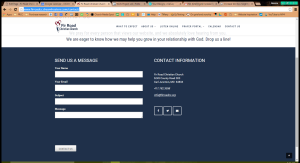
Hi Monica,
It’s possible it’s being overridden by something else Do you have a public URL where we can take a look at what’s going on? If you need to keep this URL private from other users, just select “Private Reply” on the bottom right of the comment box.
This is the current address for the website build, but it will move in a few days. http://www.firroadcc.dreamhosters.com/contact/
Hi Monica,
I’ve had a look and your theme is making your textarea look so small. It’s however, not the issue at fault here; my CSS is. Please update the CSS I gave you with the following CSS. If you navigate to AppearanceCustom CSS, you’ll get our custom CSS editor. Just add the following code.
.contact_form .sow-form-field-textarea textarea {
    height: 250px;
}
.contact_form .sow-form-field-textarea {
    margin-bottom: 100px;
}
You might also need to install the SiteOrigin CSS Editor.
This is working now. Thank you very much!
Hi Monica,
Great to hear! Is there anything else I can help you with today?
Not right now, thank you again! :)
Replies on this thread are closed.
Please create a new thread if you have a question, or purchase a SiteOrigin Premium license if you need one-on-one email support.