
 Page Builder
  Widgets Bundle
  SiteOrigin CSS
  Installer
 Page Builder and Personal Fundraiser Plugin error
Hello,
I’m having a problem with the page builder plugin conflicting with the personal Fundraiser plugin and the register user pop up is not popping up. Is this something you can help me with? We are launching a huge campaign to fund a homeless shelter and this is the one and only glitch! here is the site:
www.lotusendowment.org
Please advise!!
Thank you,
Belkis
This is our free support forum. Replies can take several days.
Need fast email support? Get SiteOrigin Premium
Replies
9Hi Belkis,
Just to confirm, this is the plugin you’re using right? It hasn’t been updated in two years and is poorly supported so I would strongly suggest switching.
Regardless, I’ll be looking into this issue to see if I can resolve it.
Yes, that is the plug in and I know it hasn’t been updated in 2 years but it was the only one that did what we needed! Now it’s all up and running except that one little thing. If i remove your plugin it works, but that would mean I would have to re-layout the whole site. any advice?
Hi Belkis,
Can you walk me through the steps of replicating this issue you’re having with the popup? I can’t find out how to do it on your website.
ok…
Here is the campaign, running on another website. It is hidden and just for testing. It’s working perfectly…
When you get to this page and enter your info for your fundraiser (try it) it all works fine and after you submit it prompts you to register or log in.
http://www.lotussupportingfoundation.org/causes/sample-cause-2/
On my live campaign site, I have applied page builder to the causes and layed out all the pages and it all works except that final “register or log in” pop up.
Here is one of the causes (computer library) on the site. You’ll see that I put a “Please register and Log in before creating your campaign” message above the create campaign button (but some people just aren’t doing it, and the campaigns are stuck in limbo)
http://lotusendowment.org/about-lotus-village/computer-library-2/
Let me know if you need more details.
Private Snippet
Hi Belkis,
I’m not too sure what you mean by popup. I managed to register via the form without issue. Could you show me a screenshot of what it’s meant to look like?
I’m sorry, im not expressing myself well… here goes again.
This is a fake fundraiser on a hidden page but it’s working perfectly.
When you click “Start a campaign” you are directed to this page:
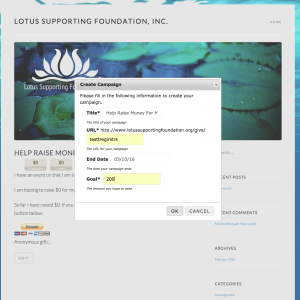
http://www.lotussupportingfoundation.org/causes/sample-cause-2/
when you hit submit, (if you are not logged in) it shows this:
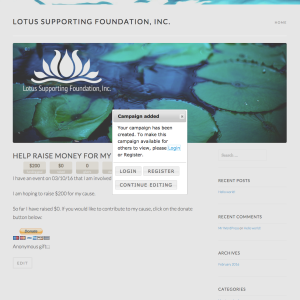
This second screen that prompts you to register or login is what is not working on the real site since I applied the Page Builder.
On the real site:
http://lotusendowment.org/about-lotus-village/computer-library-2/
if you click on “Start a campaign” without being logged in or registered, it doesn’t prompt you to and just creates a campaign without registering the person.
This is a private message.
Thank you anyway.
Replies on this thread are closed.
Please create a new thread if you have a question, or purchase a SiteOrigin Premium license if you need one-on-one email support.