
 Page Builder
  Widgets Bundle
  SiteOrigin CSS
  Installer
 New page doesn’t get “SiteOrigin Page Builder” tag


Hi,
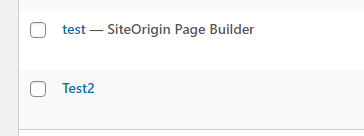
I’m struggling to understand how cloning works with SiteOrigin. I’ve created ~10 pages so far, but only one of them has “SiteOrigin Page Builder” thing written on it in the pages list, as can be shown here:
screenshot
And this is the only page I can clone. I’ve created other pages with SiteOrigin Page Builder as well, but they just don’t get that tag, so I can’t clone them. What am I doing wrong?
This is our free support forum. Replies can take several days.
Need fast email support? Get SiteOrigin Premium
Replies
5Hi LB
Cloning applies to Classic Editor pages. If you’re using the SiteOrigin Layout Block in the Block Editor you could manually clone a page by going to LayoutsImport/ExportDownload Layout within the Layout Block and then importing the Layout Block in the same manner.
OK, that works. What is the preferred way of doing this though? Classic editor or block editor?
Super, glad to hear you’re making progress.
Sorry, I’m not quite with you. The preferred way of cloning pages or the preferred way of using Page Builder?
I was thinking of what should I be using, the block editor or classic editor? Does SiteOrigin work better with one or the other or it doesn’t matter? There’s an option to use classic editor for new posts/pages in the SiteOrigin settings, which I disabled, but not sure what the preferred option is.
It’s up to you based on which editor you prefer. The Classic Editor offers the more traditional Page Builder experience and includes the Live Editor and cloning which isn’t currently available in the Block Editor.
Replies on this thread are closed.
Please create a new thread if you have a question, or purchase a SiteOrigin Premium license if you need one-on-one email support.