
 Page Builder
  Widgets Bundle
  SiteOrigin CSS
  Installer
 Never Lose a Contact Form Message with the Contact Log Addon

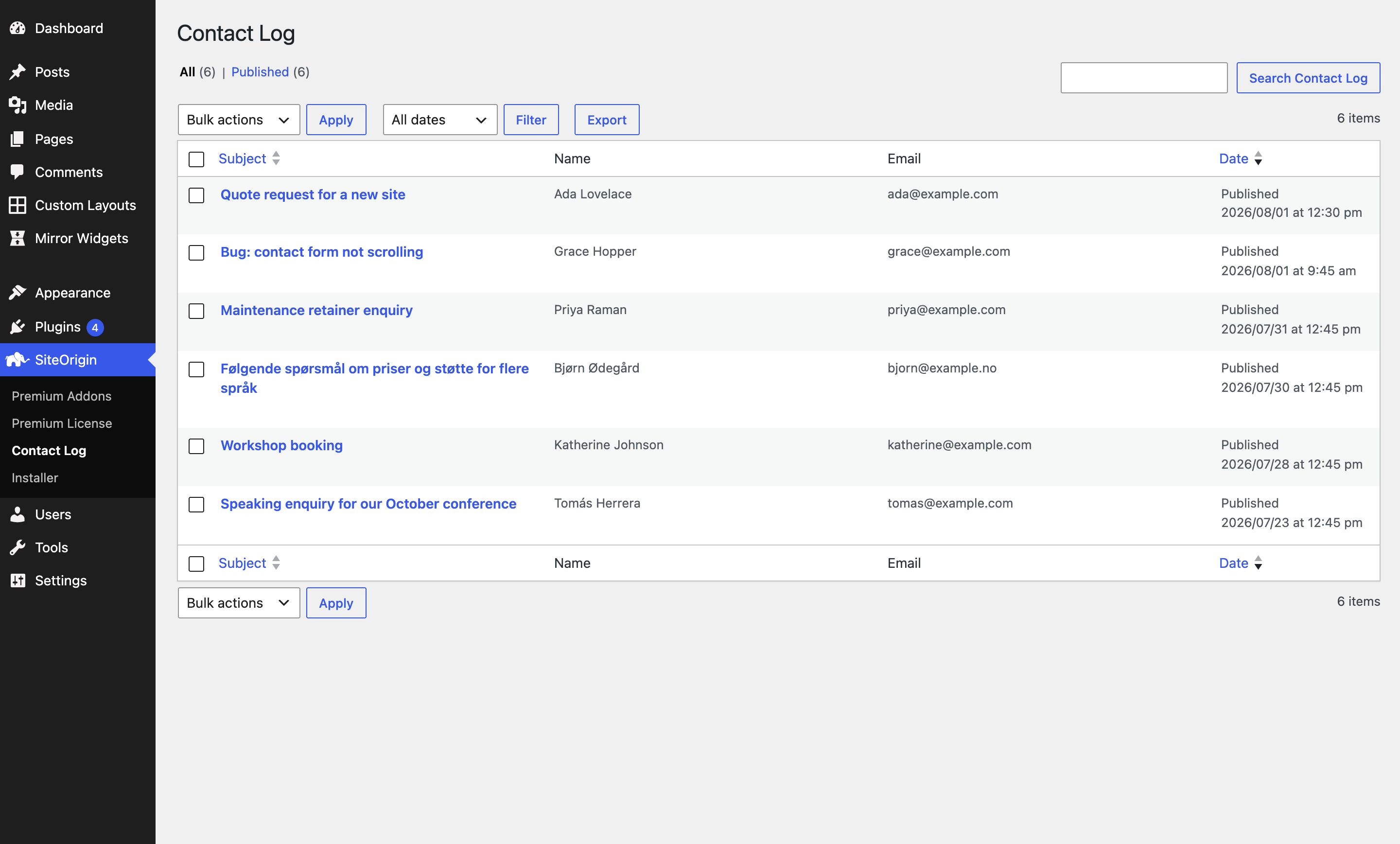
Email is a fragile place to keep the messages your visitors send you. A notification is deleted by accident, filtered to spam, or simply never arrives, and the enquiry is gone with no way to get it back. The new Contact Log Addon for SiteOrigin Premium keeps a searchable record of every message successfully sent through your SiteOrigin Contact Forms, right inside your dashboard.
Key Features:
- A Complete Record: Every successful submission is stored in WordPress, with each field exactly as your visitor filled it in.
- Powerful Search: Search the whole log by sender name, email address, or a phrase from the message itself, not just the subject.
- One Click CSV Export: Download the entire log as a spreadsheet, ready for your CRM or a reporting tool.
- Role Based Access: Choose which roles can view the log, so the right people reach your enquiries without needing an administrator account.
- Automatic Cleanup: Optionally delete entries after a set number of days, keeping your log to a retention period you’re comfortable with.
- Privacy Ready: Entries are included in WordPress’s built-in personal data export and erasure tools.
Getting Started:
- Go to SiteOriginPremium Addons and activate the Contact Log Addon.
- Visit SiteOriginContact Log to view messages as they arrive.
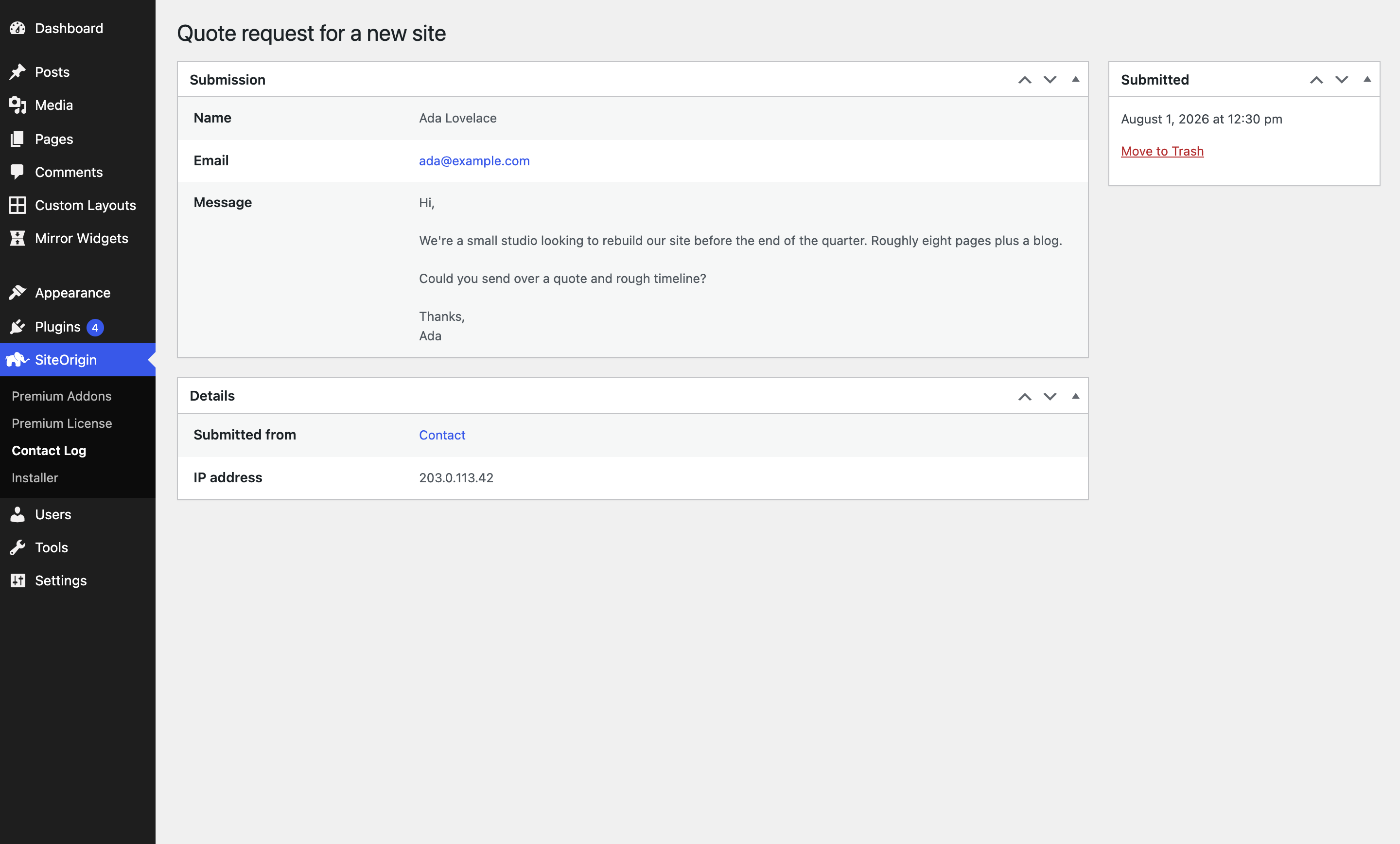
- Click any entry to see the full submission, the page the form was on, and when it was received.
- Optionally open the addon’s Settings to grant other roles access, or to set how long entries are kept.
Benefits for Your Site:
- Nothing Gets Lost: A deleted or misfiled notification no longer means a lost enquiry.
- Find Anything Quickly: Search months of messages in seconds instead of digging through an inbox.
- Shared Access: Give your team the enquiries they need without handing out administrator accounts.
- Data You Control: Decide how long messages are kept, and respond to privacy requests using the tools already built into WordPress.
The Contact Log Addon is available now for all SiteOrigin Premium users. Activate it once and every message your visitors send is kept safely alongside your site.
For detailed setup instructions and settings, see our Contact Log documentation.
Not yet a SiteOrigin Premium user? Unlock this addon and many more by upgrading today.
9 Comments
I am liking this new log! Planning to move all my contact forms to your Site Origin Contact Forms.
One question – I am the admin and am not seeing the Contact Log menu item being added to the dashboard menu. Does it only appear there for non-admins? (I am letting my Editors look at the log).
Jane
Hi Jane,
That’s awesome! So glad you like it. :)
By default, only admins will see the log. You can provide other roles with access by navigating to SiteOrigin > Premium Addons and scrolling down to the Contact Log addon. Click the Settings button, and you’ll see the addons settings.
The Roles With Access setting lets you select which roles have access to the Contact Log. Once you’ve made your selection, click Save, and the users with the selected roles will now be able to access the log.
Kind regards,
Alex
Perfect. Thanks.
Hi Alex,
My actual question concerns the Contact Log appearing in the Dashboard menu.
According to Post: Never Lose a Contact Form Message with the Contact Log Addon post, the Contact Log is shown in the dashboard menu.
[image.png]
It doesn’t for the admin (me) – but I know I can get it via the Premium Addons.
[image.png]
Does the Contact Log appear in the dashboard for the Editors whom I have set up to have access to the Log?
Jane
Hi Jane
Thanks for the extra detail.
The Contact Log doesn’t add its own top-level menu. It appears as a submenu item under the existing SiteOrigin menu item in WordPress, at SiteOrigin > Contact Log. As an admin, you should already see it there once the addon is activated. If it’s missing, a menu management or white label plugin could be hiding it, so that’s worth checking.
To answer your question: yes, your Editors will see it in the same place. Once you grant their role access at SiteOrigin > Premium Addons > Contact Log > Settings > Roles With Access, the SiteOrigin menu appears for them with Contact Log inside it.
Just to let everyone know, Support very quickly solved my issue – it wasn’t them; it was my theme that caused the problem. SiteOrigin and their support team – the best!
Glad we could help. Thanks for posting a follow-up!
This is so nice. It works perfectly.
I had a contact form that was working nicely and all I had to do was add this and it works immediately.
Thanks.
Hi Mike, thanks for sharing your feedback. If you need a hand with anything, please, let us know.
Cheers, Andrew