
 Page Builder
  Widgets Bundle
  SiteOrigin CSS
  Installer
 WordPress Vantage Premium will not let us add Media since 4.4 upgrade?

Since upgrading to 4.4 a couple of days ago, if we try to add any media (including word, excel etc) they just appear on the post as text, and not the actual attachment as it used to……
Please can someone tell me that you are working on a fix?
Thank you :-)
This is our free support forum. Replies can take several days.
Need fast email support? Get SiteOrigin Premium
Replies
13Hi Mandy
This sounds like it could be a plugin conflict issue. Can you try disabling all non-SiteOrigin plugins and see if this fixes the issue? You’ll need to clear all your caches after disabling your plugins.
If it does fix the issue, then try re-enabling your plugins one by one until the issue comes back. This procedure will help diagnose which plugin is causing the issue.
Once we know that, we’ll be able to look at what might be causing the conflict and either solve the problem or help you find an alternative plugin.
You can also try temporarily switching to one of the default WordPress themes to see if the issue is theme related.
I deactivated ALL of the plugins but the issue still persists…..
We use a child theme for Vantage – copied below – any suggestions pretty please?
/*
Theme Name: Vantage Child
Author: SiteOrigin
Author URI: https://siteorigin.com/
Theme URI: http://intranet/
Description: Vantage is a flexible multipurpose theme. It’s strength lies in its tight integration with some powerful plugins like Page Builder for responsive page layouts, MetaSlider for big beautiful sliders and WooCommerce to help you sell online. Vantage is fully responsive and retina ready. Use it to start a business site, portfolio or online store. We offer free and premium support on our support forums (https://siteorigin.com/thread/).
Template: vantage
Version: 2.4.2
License: GNU General Public License 2.0
License URI: license.txt
Tags: responsive-layout, fluid-layout, custom-background, custom-menu, featured-images, theme-options, threaded-comments, translation-ready, black, white, light, one-column, two-columns, full-width-template
*/
@import url(“../vantage/style.css”);
It appears to be Microsoft documents that are a particular problem….
It is still a problem – any ideas when there will be a fix please?
Love the Vantage theme and use it on 5 different sites
Thank you
Hi Mandy
I’ll have someone take a look at this. Can you confirm that the issue is the same on all the sites running WordPress 4.4? Also, what happens if you temporarily switch to a default theme like Twenty Fifteen? Do you still get the same issue? It might be related to something that changed in the core of WordPress for 4.4.
I have only upped the internal Intranet at work so far – I can upload images, but no word or excel.
I will try one of the others now and let you know…..
Thanks
Have tried it with two of the other 4….
http://www.birminghamsag.org.uk/ doesn’t work (same problem as the St Basils staff Intranet – cannot add or even use existing office documents)
http://mercianleague.co.uk/ DOES WORK!
Both are Vantage premium
Any ideas please?
Just changed the http://www.birminghamsag.org.uk/ to Twenty Sixteen – and the problem still persists – the only plugins on that site are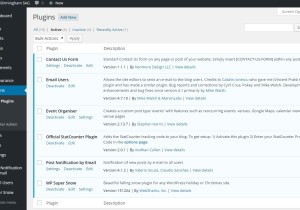
I know ours at St basils is on a Linux server – not sure on the other ones
Same problem with PDFs too – although existing pictures will still load and allow you to add to new posts
This might also just be related to the attachment display settings. When adding media in the WordPress editor, you get an option down the right side on how to embed the attachment. Maybe just choosing the correct setting there will help.
You are amazing!!!! Thank you :-) Guess this is an addition with the upgrade?
I’m not sure if it was added in 4.4, but I for one haven’t come across it before.
Stumbled across it while I was trying to figure out this issue. Very glad that solves the issue :)
Replies on this thread are closed.
Please create a new thread if you have a question, or purchase a SiteOrigin Premium license if you need one-on-one email support.