
Price Table Plugin for WordPress
Thanks for visiting this post. The SiteOrigin Price Table plugin is no longer supported. Please, try the Price Table widget which is part of the SiteOrigin Widgets Bundle.
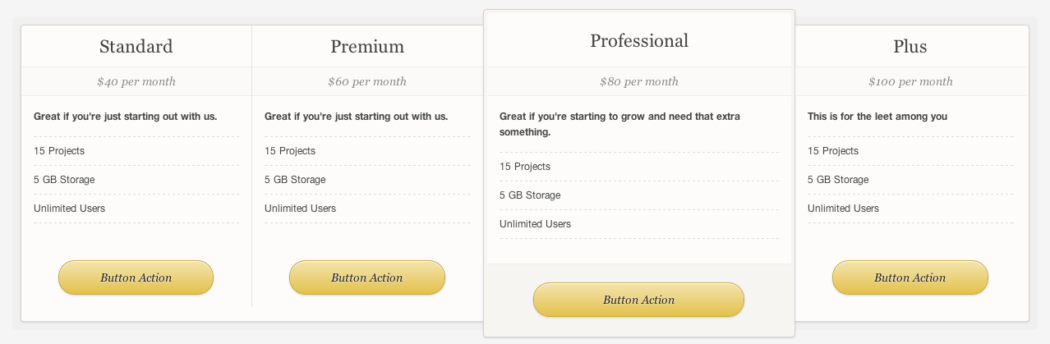
When I saw this beautiful price table design, by the equally dashing Orman Clark, I knew I had to turn it into a WordPress plugin. I’m very happy with the result. I managed to almost exactly reproduce Orman’s design using pure CSS3.
It has a simple drag and drop builder. Perfect if you don’t like fiddling around with shortcodes.
Theme developers, feel free to include this plugin with your themes. All the CSS and JS are GPLed, so you’re free to use and abuse the entire plugin.
RoadMap
- Improve representation of Orman’s design using CSS3. The borders for the price field in the featured column aren’t a perfect recreation.
- Improve price table builder UI.
- Add more price table designs.
- Test in IE8. I’m using Mac, so any help here would be appreciated.
Great. Downloaded!
Thanks.
My pleasure! Please email me if you need any help [email protected]
Greg thanks for the plugin,
I’m new to wordpress, is it possible to take off the select button and change the colours around?
How do i do this? where do i find the css for the plugin?
bugs
Heya Bugs! Right now it’s possible to do this by hand, but it requires some CSS3 know-how. If you’d like more help, please post in our support forum. I’ll be adding more advanced customization to the price table plugin in the future. It’d just be a matter of carrying across the code I’ve written for Origin Framework.
Hi Greg! Great plug-in. I too was hoping to change the colors of each price table. Any links to CSS3 code tutorials?
I really love this plugin.
I had a problem using it with my theme. The last table kept going underneath.
My theme developer told me to add this and it fixed it so I thought I would pass it on.
Try putting this in the custom CSS option on your theme options page:
.pricetable .column { margin-right:0; }
You did great job with this. It looks and works great mate!
Awesome! Helped so much!
I’m glad you found it useful :)
Hello,
I would suggest you to correct your URL link into your wordpress plugin details. It seems that you forget the http:// part then If I check your plugin using addins menu in wordpress and then click Details then SiteOrigin, I get this page : http://wordpress.org/extend/plugins/pricetable/siteorigin.com/pricetable-wordpress-plugin/
Nice plugin
Regards
Oops! Thanks for the heads up. I’ll fix that now.
Great looking tables, thanks
Thanks, my pleasure :)
how to place the pricing table?
The price table automatically shows up at the top of the price table post. If you’d like to embed the price table on another page, then you can use the price_table shortcode. This shortcode needs an ID, but you can copy that from the Shortcode metabox on the price table builder page.
Hope that helps.
Hi, sorry to bother you but i’m using the plugin but when I enter a subtitle in the feature list (where you can enter a Title and Subtitle for each attribute) The subtitle is not displayed when the price table is rendered on the page, here’s an example of what i mean http://www.creativesolutions-online.co.uk/client-area/totalbeautycare/hair-removal-treatments if you could take a look and tell me why the subtitles wont show i would be very grateful thanks
I replied to your email. I sorted out that issue by testing the plugin in a few different themes.
Hi there and thank you for a unique plugin. The only one of its kind in wordpress.org
I just installed it on local test site but unfortunately the button url as well as the button text do NOT save.
What I put there is http://mysite.com/sample-page/ and “Press me” in order to test it.
How can I do that? Am I missing something?
Thanks again.
PS.: I think it would be nice if you had a plugin installed at your site (like subscribe to comments). It is very helpful.
Thanks for being willing to use such an early release of Price Table, It’s feedback like yours that helps me build a really solid plugin!
I tested it and button text and URLs seems to be working on my local server. I’ve set up a test account on my Hostgator server to see if I can spot the issue there. I’ll email you as soon as I’ve sorted it out.
Good call on using subscribe to comments – I’ve downloaded it. I’ll be installing it on SiteOrigin soon.
Thank you Greg for the e-x-t-r-a fast reply.
You have my email. Please use it. I have couple of ideas to share and willing to help you de-bug.
Thanks again.
About the comments. Another very good alternative (I use it myself) is this http://wordpress.org/extend/plugins/subscribe-to-comments-reloaded/.
Enjoy.
Hi, first off thank you for building a pricing table that actually works. The irony is, I have gone through a few paid versions and yours is the best looking and of course very usable!
One thing I wanted to know was if you should decide not continue to support this plug-in in the future does that mean all my tables could eventually not function with future wordpress updates? Or is that not how CSS and JS work? Thanks again for a fantastic job!
Thanks Tex! Makes me so stoked to hear that my plugin is as good as some of the commercial options out there.
I’m going to support this plugin well into the future. You have nothing to worry about. WordPress is so stable these days – keeping a plugin working across releases is a breeze.
This is the only plugin which has come close to what I really wanted. Awesome plugin and absolutely easy to use.
One suggestion maybe … The features are left aligned when creating a table … I had to use DIV center … could you make them center by default in the next release ?
Thanks a lot for this awesome plugin :)
It’s my pleasure Shishir! I like your idea of letting people choose between left and center aligned. I’ll definitely add this to a future release. Good call!
You need to add:
.pricetable code {white-space: normal;
}
to your stylesheet, in case the theme’s stylesheet has white-space: pre; set for code and pre elements — as my current theme has.
Is this on GitHub, so I can send you pull requests?
I’ll have a look at adding that CSS. One of the challenges with this plugin has been making sure it works with a range of different themes. Thanks for the feedback! It helps a lot.
Right now, I’m just using the WordPress plugin SVN for version control. I do use GitHub for other projects, so it might be a good idea to move all my plugins and themes there too. Especially for pull requests.
Hi,
I’m trying to use this plugin to create a price list but when i input the details it wont save or publish them. All my work keeps disapearing, can you help?
Hi Terri. Sorry you’re having an issue with the plugin. Something I’ve noticed is that WordPress doesn’t seem to save data if you don’t enter a title for price table (the main post title). So try making sure the title is set before you save your price table.
I’ll try fix this issue, cos I can imagine that’s quite annoying.
hello..
how to put the tables in templates.. i am planing to put on my index.php?
You don’t need to modify your theme at all. All you need to do is create a price table post type and link to it using a custom menu. I’ll be putting together some video tutorials this week, hopefully these will help.
Hi, I have downloaded your plugin which looks great but I have no idea how to set it up. Are there any installation instructions anywhere?
Sorry, I’ve been really bad about writing/recording documentation for this plugin. I promise it’s coming soon! I’ll email you as soon as it’s done.
Love it! Thanks so much for making this available for free. I’ll write a post about it on my site and give you some props for such a lovely plugin.
Yay! Thanks a million Angie! Props are what give me the motivation to build all this free stuff and publish it on SiteOrigin :)
Would love the ability to NOT have a recommended plan. In the interest of the paradox of choice, I’m just offering two levels. Free and Paid. With only two – the recommended just looks a little goofy. I’m sure I can probably futz with the css a bit, but thought I’d throw that out there.
You know, I totally overlooked that. So true. I’ll make that an option in the next update.
For Sarah who wanted to not have a recommended column, I have a work around. Create a new column, make it the recommended column and then delete it.
Greg, this is a fantastic plug-in, will totally promote. Any chance of a way to have all the buttons on the bottom to line up evenly?
Thanks for suggesting that fix Paula. That’s a very clever work around.
If you add the same number of features to each price table column, the buttons should line up. If this isn’t the case, please post/email a URL so I can investigate. The featured column button wont align, but that’s part of the design.
Hi Greg , I really like your plugin – Well I don’t know if you can help – i get this error message on my table :
Warning: Invalid argument supplied for foreach() in /home/alounes/public_html/www.computerplusplus.com/wp-content/plugins/pricetable/pricetable.phtml on line 12and you can see it here :http://www.computerplusplus.com/pricetable/services-home-users/
I hope you can help with this issue.
otherwise great looking pricelist atble that’s goes with very well with my theme color.
Aris
It looks like you’d get that error when you create a price column without any features. I’ll make Price Table deal with that situation more gracefully though.
Hi Greg,
after installing the plugin and created a table, next error appears…
Warning: Invalid argument supplied for foreach() in /home/xxxxx/domains/xxxxx.com/public_html/wp-content/plugins/pricetable/pricetable.phtml on line 12
Sorry… overlooked the same question above :-(
No worries Martin. I’ll get the issue sorted this weekend.
Thank you for creating this Wonderful Plugin. Works like a Charm. Does what it says. I’m very happy with the results.
One question though. I have the link here : http://www.socialstrategi.com/?page_id=341
Is it possible to change the width of the table. I would like to make it wider so that most options fit on signle line. How can I do that?
Thanks
Shilpi
Hi Shilpi! Sorry for my late reply. I missed your comment in my approval queue. It’s awesome to see someone using this plugin on a live site!
The price table will automatically scale to fit the width of the page its on. Some themes have an option to create full-width pages (which basically hides the sidebar. If your theme has this option, that might make your price table look less cramped. I see you’re using an Elegant Theme. I haven’t used them before but, based on their reputation, I imagine they’d have the option for full width pages.
Hi Greg.
Thank you so much for such a great plugin (so timely for my needs :) I am getting ready to release a pro version of my plugin (lite version in the plugin repository Events Planner for anyone interested) and was dreading the thought of making a pricing table manually. Kudos to you my friend.
Abel
Stoked Abel! It’s always awesome to hear my plugin is helping someone, especially a fellow plugin developer. I had a look at your plugin, it looks very cool. “Event Planner” is actually on my list of future plugin ideas, but I’ll cross that one off, seems like you have it covered. Let me know how the launch of your pro version goes.
hey Greg.. I just ran across your plugin and starting playing around with it for a couple of projects that I’m working on.. It has great potential! Great job on porting the price tables to a wordpress plugin!
I have a couple of problems/suggestions..
As for the problem, I created a price table for portrait sessions. The only thing different with my three session types is the time. I was able to give all the information needed in the description field so I didn’t create any features. This resulted in errors because of an empty foreach() loop. Would it be possible to add a quick test before executing the foreach() to see if that field has any values in it and if not, then skip building that portion of the table?
As for suggestion, at times there may be a special that is being run where prices would be discounted. Would love to see a cross-out option on the price which would result in CSS that would put a red strike-through over the price and when checked a discounted price field would be displayed to allow us to enter the sale price. Maybe even display the discounted price in a larger point size?
Keep up the awesome work!
Hey Shawn! I’ve sorted out that bug in my working copy of Price Table. So it now deals with empty tables more gracefully. I’ll be pushing my changes soon after I’ve done some more fixes and testing. I’ll let you know when I push the update to the WordPress plugin directory.
I’m with you on the feature request. That’s definitely something I can see being useful to a lot of people. Hopefully this will also be in my next update too.
Thanks for the suggestions. Please, keep em coming if you can think of anything else you need. They’re really useful.
LOVE this plugin!!! One question…I clicked “recommend” on one package just to see what it did, but I don’t care for the way it looks in my table. Problem is, I can’t figure out how to deselect it. Surely there’s a way? Thanks!
Glad you like it Carole :)
Oops! When I built the plugin, I sort of assumed that everyone would want a featured column. I’ll make the featured column de selectable in my next update. It’ll be a pretty easy change.
I see you do Social Media Management. Cool! I’ve actually just started working on a (free) WordPress plugin just for SMMs like you. Something to keep an eye out for.
I’ll definitely keep an eye out for that plugin, Greg! BTW…where exactly should I be looking…on this site? The only reason I didn’t like my table when one was featured is because it looked unbalanced (some packages have similar features so I wanted them lined up next to each other, but when I featured one it threw it off). Sorry I haven’t published them yet, so you couldn’t see what I mean! Which actually brings me to another question: if I want to publish them as a page, do I just insert the shortcode? As you can tell, I am a newbie at doing websites (one reason I liked your plugin so much…no coding for me!). What I don’t know about websites/coding, I make up for in social media knowledge. :) Thanks!
Never mind, Greg! I got them published! I did 3 and I think they all look great! I’m also following you on Twitter now so that I don’t miss the announcement of the SMM plugin! Thanks for making this plugin…it was just what I needed!
Awesome, glad to hear you got all your price tables sorted out. I’ll still be adding that feature you requested though. I’m sure other people will need it. Is there anything you still need help with?
And yeah, the best way to keep up to date with all the free stuff I publish is to keep an eye on this blog. Twitter is a good place too (although I’m not all that twitterish). If you just want the big juicy announcements, then you can sign up to my newsletter http://eepurl.com/hbvhM (I still need to add a signup form here somewhere).
Thanks, Greg! Signed up for the newsletter! Also, just wanted to tell you that I’ve been getting great feedback on my price tables from other SMM’s so there’ll probably be a lot of SMMs with your tables on their sites We’re excited to see what the SMM plugin offers! I have nothing but good things to say about the plugin and if you can make the “recommend” an editable option, it’ll be PERFECT! :)
Hey Greg,
I like your plugin! Where can i set the button text and URL?
Hi Hilco. I’m sure my plugin likes you too :D. There are fields for both the button text and button URL fields. After you click “add column” you should see them there.
Hey Greg,
Thanks for making such a wonderful plugin for free,as stated above it works better and easier than most paid versions. Good job,its plugin creators like you who make WordPress the best!
Thanks James! Really awesome to hear that. I love WordPress. I’m just doing what I can to add to it in some small way :)
Hi Greg,
I have a problem with the plugin. I get a message all the time with: Warning: Invalid argument supplied for foreach() in …..and then: on line 12
Any idea what I do wrong?
Further Cool plugin ! Thanks for sharing it.
Sorry about that issue Stefan! I’ve fixed it on my local copy of the Price Table. I’m just doing some more testing before I publish my changes to the WordPress plugin directory. It’s caused by not having any features in a price table column, so a quick fix is to add a few features.
Ok Greg cool thanks.
I also wanted sometimes just one column on a page, but when I do that the button goes very wide, maybe you noticed that.
Hope it’s also a possibility to fix that.
Keep up the good work, thanks ! :-)
Greg,
Great plug in. I am trying to change the color of the button but can’t find the code to change it. I was able to change the color of the writing inside the button but that’s about it. Please let me know how to do this. I also like the way Carole set hers up flush like that. That’s the look i’m going for as well.
Thanks
Steve
Hey Steve! To change the color of the button you need to look at lines 195-202 of pricetable.css. I’ve used CSS3 gradients, so it’s pretty easy to change. I use ColorZilla’s gradient tool to create my gradient styles. I really recommend it. The only problem you need to take note of is that when you update the plugin, it’ll overwrite any changes you make to the CSS. I’m hoping to overcome this problem in a future release.
As for setting up your price tables like Carole. Right now you can do that by just not selecting a recommended column. The problem is you cant go back to having to recommended column after you’ve selected one. So just be careful. Again, this is something I’ll fixe in the coming weeks.
Hi Greg,
Still loving the plugin! I have a question that has nothing to do with the plugin, though. In your reply to Hilco you provided a screenshot. I was wondering which screenshot program you used? I need to do some tutorial presentations and have tried several screenshot programs, but I can’t seem to get the arrows to look right. Not bold enough, etc. Any advice you can give will be appreciated!
Thanks!
Carole
Hi Carole! I’m always happy to help. I use TechSmith’s products for all my screen grabbing needs. I used Snagit for that screenshot. They have Windows and Mac versions. For capturing video I use Camtasia – which is just awesome. Their Mac version is also pretty cheap.
Thanks for the info, Greg!!
Hi Greg,
I love Orman’s table design and it was generous of you to create a WordPress plugin…do you by chance have this available in just html/css?
Heya Seth! Orman is a brilliant designer, isn’t he? I just couldn’t help myself from coding up his design. Technically all the HTML/CSS is in the plugin. You can dig it out if you know some PHP basics. If you’d like, I could put together an HTML/CSS package.
Yep, he sure is! I love his style. I’m a big fan off all his works. I can try to dig out the HTML/CSS from the plugin, but my PHP knowledge isn’t the greatest. If you don’t mind putting together that HTML/CSS package when you get a free chance, it would be greatly appreciated :-)
Hi there Greg. I know you originally set your plugin for price comparison. However I kind of ‘misuse’ it by employing it to display a schedule. I need to have the fonts smaller, though. Would you please tell me how to make them smaller? And perhaps general advice on how to play with typography, cell colour, and cell height/width? As you can see in http://joinmun.ugm.ac.id/events/schedules/, the table indeed provides much better appearance rather than the standard plain wordpress-esque table. However, some aesthetic touches wouldn’t hurt, would it?
Many thanks for the advice.
Regards,
Rizky
Hey Rizky! I’ll reply to you by email so I can give you more in depth help.
Hi Greg,
Thanks for the reply on the coloring. Although I do think changing the color would be slightly better, i think I am going to leave it as is. Also I decided to leave it as is with the columns as well since the 3 columns look great out of the box after putting them together.
Hi Greg,
Thanks for the great plugin! I’m trying to set up my price list but it seems that i can’t get it to show english pounds £ or euro € symbols? Obviously th $ sign works ok. Is it something I’m doing wrong?
heres my test page: http://www.salthillstudio.com/?page_id=1829
Regards
RIchard
Hey Richard! Thanks for checking out my plugin :) I’ve had a look and it seems like the issue is with your theme – Simpolio. I can see from the HTML that it uses Cufon to display the price field. My guess is that either Cufon or the font it’s using doesn’t support £ and €.
Your best bet is to ask Kotofey (the theme’s author) for some help. I’m sure he’ll be able to help you out. Let him know he can contact me if he has any questions.
Hi Greg, Thanks for the tip! I looked on the dev’s pages and he had updated cufon js font files. I just updated them all on my server and the £ sign now works!
Thanks again for all your hard work in making tho plugin!!!!
Looks awesome, thanks for the hard work mate :)
Thanks Rui :) This is just the first of many freebies I’ll be releasing. 2012 is going to be a big year.
Hi Greg,
I love this plug-in, but seem to be having difficulty in getting my 3 products to line up together. The third one keeps getting bumped down blow the top 2. Do you have any suggestions? Also, how do I link the button to the product for customer purchase?
Anne
Hey Anne! Would it be possible for you to give me a URL to show me what you mean? This will make it a lot easier for me to help you.
There’s a field “button URL” in the price table builder. You just need to enter the purchase/signup URL in there.
My boss loves this plugin! It helps him so he can create offers without code. It is really nice. Thank you so much!
Is there a way to have the buttons line up at the bottom?
Hi Greg
Excellent plugin. I am having a problem getting my 3 products to line up evenly as well. I have tried adjusting some CSS lines , however the only column sizing option is in the admin pricetable/css/pricetable.admin.css See the preview page of products not lining up
http://www.creditscoretechs.com/?post_type=pricetable&p=1243&preview=true
Hey Shane! It seems like the link you posted is 404ing. I’m going to create a support ticket for so I can help you with this issue.
i think it was because it was a draft instead of published because i wasn’t actually finished with the setup and didn’t want to publish until finished. i went ahead and published so you could view it. i really want to use this plugin as i can tweak the css to fit my needs, and the plugin is very cool, but i have to have it working correctly. please assist me in getting these columns lined up correctly.
i forgot to give the link. here it is;
http://www.creditscoretechs.com/pricetable/pricing1/
Aaah, that looks like a CSS conflict problem. A few themes use the same CSS classes as the price table, which tends to destroy the design. I’ve got this issue recorded in my issue tracker and I’ll be fixing it in the next update. I’m really hoping I can find time to work on it soon!
Love it! Installed plugin, configured my pricing table, and published, all in less than 20 mins – thanks Greg, you rock!
Thanks a million Cooper! My ego has officially been pumped for the day.
First off, kudos for the plugin, good stuff! I’m using the pricing table as a checklist with the first column as the service listings … is there a way to remove the sub title line in the right hand columns in order to vertical align a check mark alongside the listings? Thanks!
Hi Matthew, would it be possible for you to send me a URL to show me what you mean? Just drop an email to [email protected]
I have used so many of these “pricing table” plugins that I really did not want to use yours. Every single one I used had issues with the theme I used and most of them seem to be a copy of others. I reluctantly used your plugin and it worked straight out of the box. Well done. Excellent work.
Hi Dave! Ego boosting comments are one of my best type of comments – I’m not gonna lie. Thanks, I’m glad you liked my plugin :)
Hello, I’m having some troubles getting this to work. It seems like the css is messed up, wondering if you might have some workarounds?
http://www.eugenedirectory.com/pricing/
It’s posted with the shortcode. Top is cut off of the featured price.
Hi Shawn! That looks like your theme and my price table are conflicting. I dug around your HTML a little bit and I can’t quite figure out why. Can you try contacting Templatic (they made your theme) and see if they have any ideas. Please let me know if they have any ideas – [email protected]
Hi
Thought I’d let you know the following…
I am running WP 3.3.1 on Genesis framework and Backcountry theme.
I can create the columns in the table OK (3) and completed the various fields but it does not show up in either the visual or HTML areas in the page layout area above the table creation area
The only way I could get it to function is to copy the shortcode to a new page
Hey Peter! The problem there is you need to refresh WordPress’ URL rewrite cache. In your WordPress admin go to Settings > Permalinks. By just loading that page, WordPress will refresh everything and the page will be available. I’ll fix this in the next version.
Greg: Have you come up with any instructions yet as to how to use the plugin. I have it activated but after that — help?
Unfortunately I haven’t written any yet Joyce :( It’s on my TODO list but right now I’m working on a big-fancy-new feature for SiteOrigin. WPBeginner actually did a good job of explaining how to use it though http://www.wpbeginner.com/plugins/how-to-create-a-clean-price-table-in-wordpress/
Hey Greg, first thank you for having the best price table plug in!! srsly bro Thank You! I have 3 different services I offer which the plug in is awesome for that, but I also wanted to offer 1 month, 3 month, 6 month, payment options on all 3 services. Any works on that for the future?
It’s my pleasure Lenny :D I appreciate the feedback! As for your feature request – I can’t think of a good way to do this. Having 3 separate buttons for each column would look a bit messy. Do you have any other ideas?
I was thinking of radio buttons. So rather than just a select button, they could select the radio button and then choose select.
For Example:
I create 3 Col. I give each a name I add the features, price, but then also a section for options (and in options I could put 1 month, 3 months, 6 months) and next to each of those there could be a radio button for my customer to select, after the choose how many months they want then they could choose select.
or a drop down menu of options… It could work the same if I was doing 3 different shirts and had them in 3 different colors, Rather than creating 9 columns, 1 for every color I could create 3 columns and let them select which color they would want
Got you. I’ve added this feature to my issue tracker. Do you mind if I get hold of you when I start working on it? Just for some feedback on wireframes, etc.
Yeah no more problem
Hey Greg, I’m just in the process of setting up a table using your plugin now, so no feedback yet… just wanted to say how proud I am to see a fellow South African creating amazing things like this! :D Oh I do have a question though… you know how some comparison tables have like an index of features on the left, and then columns to the right for the various versions of the product/service with nothing more than X’s or ticks? Is that at all possible with your plugin?
Howzit Phil! It’s always a pleasure to be helping out a fellow South African. Watch this space, there’s some awesome stuff coming up. I’ll announce everything in my newsletter, which I see you’ve subscribed to (big thanks). My plugin doesn’t support that type of price table yet, but it’s definitely something I’ll look into adding. I’ve needed that exact price table layout in the past.
Hi Greg,
Have you had any progress with this evolution of your great plugin?
Regards,
Stefan
Hi Greg,
Having read through all the love that has been sent through to you in this stream I’ve been trying to come up with a new superlative for you but I think saying “you rock” pretty much sums it up! Thank you so much for your OUTSTANDING work on this plugin – I can’t wait to see what you do next :)
I sent you an email yesterday regarding the font of the button text. I have a font replacement plugin which has taken care of the rest of the content in the price table I have configured and as stylish as it looks, the default font for the button text kinda clashes with the aesthetic I’ve put together for the site I am working on. Could you advise me on how I can modify this element? Also, the colour of the text in the button is a little bit faint so some tips on how to customise this section would be amazing!
Thanks for all your hard work, mate!
Hey Jose. First off, sorry for the super late reply. I’ve been hard at work building this latest update to SiteOrigin. It’s a big one, so stay tuned.
You have no idea how awesome it is hearing that people are enjoying my stuff. I’m losing sleep, sanity and blood building up SiteOrigin – hearing from people like you is what gets me up in the morning.
As for modifying the plugin. Right now you need quite a bit of CSS know-how to customize its look and feel. Making it easy to customize with color pickers and sliders is high up on my TODO list. If you’d like help doing the customization by hand, please post in our (bran new) support forum.
Great plugin. No problems using it, it is very intuitive to use. It’d be great to be able to make the ‘recommended’ column a different color!
I’ll be adding all kinds of customization options in the future… it’s coming… sooooon… I hope :)
You rocked it, Greg! I admit, I struggled a little initially, for the lack of instructions for setup, but the WPBeginner explanation was great, and this little baby is just what we needed! Nice job, and kudos for making it free!
It’s my pleasure Doc :) I have someone joining me with SiteOrigin in the next few weeks who will be helping me write documentation. He’s going to be a massive asset to SiteOrigin!
Hi I emailed you a few days ago I don’t know if you received my email however I am having trouble with the plugin because it does not display correctly it displays an empty column and pushes the other ones below. I am using headway theme I don’t know if it is causing the problem. I pasted the short code in a widget block. Here is the link to my website http://tenafter.me. Help would be much appreciated.
Hey there Frank! I was having some problems keeping up with support emails, so I moved over to a support forum to try get support running more smoothly :) Would you mind posting your question in the support forum? https://siteorigin.com/forum – I’ll be able to help you out there.
I really really like this, however, the .pricetable .header p css is inheriting my theme’s .header (which blows out the header 100% across the page). If I use an inspector and turn off the 940px width for the .header, it snaps back how it should. However, I can not find where I can edit this on your plugin. I’ve tried swapping around the css in yours a little with no success.
Is there a way to adjust the php script so instead of it writing it will write ?
This isa very late reply – but the latest version of the price table plugin fixes this issue. I’ve prefixed all the classes so they no longer conflict with themes.
Hi Greg,
Thanks for doing this, quality work!
Looking forward to some new options, it would be great to select colours (zebra stripes) and also have a custom side panel as an options list as well as an image option per row instead of/as well as text
Hi Greg,
Love your plugin! Thank you!
One question:
I”m using google fonts for my headings and the default of this plugin is to use those preset heading fonts.
I love the google fonts on my site but they look rather crappy when used in the pricing table – is there any way I can easily change this? The page is http://www.businessfromtheheart.com/services/
Thank you, Greg!
:)
Hi there Susan. I’ve had a look at that link – yeah, that does look a bit off. The only way to fix this would be to delve into the CSS of my price table plugin and/or your theme.
I’ve heard from a lot of people having these sorts of conflict issues. I think the best way for me to fix this would be to make it easy for theme developers to integrate my plugin into their themes. That way, your theme would have total control over the look and feel of your price table. I would need you all to nag your respective theme companies to add support though ;)
Hi Greg, beautiful plugin. I am using to display and compare some prices for services. I have no shopping cart or other reason (or idea) of what I can do with the button. Anyway to remove it? I found it in the css and managed to remove the actual button but am left with the word “select” and with the option for my users to click on it. Any insight would be greatly appreciated.
Thanks again!
Hi, I just updated to 0.2 and now my price table isn’t working anymore… I’ve cleared my cache — and I even tried deleting the existing table and creating a new one. Still no luck. Is it just me?
Thanks so much for your help. This really is a wonderful plugin!
I just upgraded as well and am getting the same thing. version .01 was working great now im in a panic. is there a link to the version 1 I dont have it anymore on my drive.
All I can say is WOW Greg was online at the time i posted my issue and he found that it was a CSS refresh issue on my end. All is working like it should thanks to Greg. He is the BEST!
Just updated and now the featured Table hasn’t got a background colour. Can I fix this somehow?
Very late reply – but a simple browser refresh is all it takes. The latest version of the plugin also doesn’t require this refresh. I hope you got your issue sorted!
Great plugin, wondered if there was any way of adding different colours? changing text colours etc?
Hey Beth :) this is possible if you know CSS. I’ve added a feature that lets you add add customizations to your theme. I still have to document it though. Hopefully I’ll be able to get around to that soon.
Hi Greg,
Nice plugin!
Is there a possibility to open the links of the pricetables in a blanc window? (what code do I need to add? :-)
Thanks!
This is possible, but it requires a little bit of code wrangling. If you need help, please email me [email protected] – I’ll give you some pointers.
would love to do this as well. please tell us where in the code we will have to change something
Thanks for a great post and an awesome plugin..
I created a detailed video, to show my experience, and how this plugin will work.
Check it out here, and hope you find it useful.
http://getyourblogready.com/?p=548
That isn’t actually using my price table plugin, but hey – a price table is a price table… right?
Very nice plugin! You saved me so much time. thank you Greg.
It’s my absolute pleasure :D
Hi Greg
How do I stop the interference from the excerpt in pricetables with the excerpts in my website. Everytime I click on the buttom to “continue reading” it takes me to my pricetable.
I will appreciate your help.
Thanks for the email Claudia. Sorry I couldn’t figure out your issue. It really had be baffled!
Hi Greg,
I was able to add features to 1 column of my table, but when I click add on the other 2 columns, the page just refreshes – it appears that I can’t add more features.
Let me know if you need any more info, and thanks in advance for your help!
Was able to get it working by deactivating/reactivating the plugin.
Hi Greg,
Thanks for this amazing pricing table! I really like it! It’s so beautiful plugin and very nice for my business website! Many many thanks!! And it’s easy to use :)!
I have a question to you. I hope that you can help me out!
I want to delete the ‘price button container / Select button’ below where the ”Select” is to select an product. Also where ‘Select’ is an hyperlink.
The reason why is that I’ve already maked an orderform for the products (fully php).
I’ve already checked and re-checked the CSS file and the page source, but I can’t find it in the CSS-file or other files.
Can you help me? If you want more information, please feel free too email me :).
Thanks for your help!
Best regards,
Bas
hi. great plugin! congratulations.
its is possible to reduce the space between the detail and button text?
Hey Greg !
I just heard about the plugin and I wonder why I did n’t find it back in last year. It ‘s an excellent solution
May I know if the layout is compatible with Mobile devices and other small screens? Ofcourse, I can manage it by making into fluid style. But the look might become ugly
Can you please help me with it ?
Hey Greg – very slick bit of programming – exactly what I was looking for – thanks very much!
Jas
Hi Greg,
Your design is exactly what I was looking for to use on my three Word Press sites… it is clean, sleek, pure and easy.
I am a novice, and I’m having a bit of trouble due to my lack of knowledge. Would you be kind enough to share with me how to adjust he settings to vary the width of the columns and how to add the variety of service descriptions (when you have more than one service.)
My other question is where do I put my PayPal code- So members can pay their dues?
Greg, I would like to recommend your plugin to my association members (Association of Corporate Executive Coaches: http://www.acec-website.org) in what will be my new technology recommendation section of our newsletter as well as to our LinkedIn group (Association of Corporate Executive Coaches, NETWORK)- Most of the members are solo practitioners and badly need this plugin for their websites and/or blogs. Therefore, I want to have it fully functional before my recommendation is released.
Most Sincerely, CB
Greg,
Thanks for a great plugin. Maybe it’s just me but I could download the documentation. Don’t see how to adjust the size and spacing of the table.
thanks,
Wesley
Hi Greg
Thanks for developing such a great plugin. One small thing, hopefully you can help… ? :)
Not sure if it’s a fault with my theme or because IE9 is pretty crap, but I’m seeing Price Table displaying quite oddly on IE9 compared to Chrome / Firefox etc.
Is there anyway to fix this?
http://maccam.co.uk/?page_id=6
Thanks in advance matey!
Matt
Any chance the Buttons could utilize PayPal Button Code??? I have 3 membership levels that I am setting up and have 3 PayPal buttons for the subscriptions to be paid through PayPal. I am not sure how to implement the code in the plugin or the dashboard.
Any ideas?
You would be the first Plugin to offer this feature and would make this a very valuable item for you!
This fixed my issue with IE9, pasted to the very top line of the WordPress header. Forced IE9 to stop trying to be clever, which it isn’t.
Thanks!
HI I’M AMATEUR
PITCH PREMIUM
GOOGLE CHROME NO PROBLEM
BUT
IE EXPLORER ALL VERSIONS IS PROBLEM FOR VIEW
WHAT IS THE SOLUTIONS
PLEASE HELP
THANKYOU
Hi, great plugin, best price table I could find.
I wanted to see if I could somehow make a shortcode for a lightbox to execute when the button is pressed. Is their away to remove the automatic url it creates when the buttons is clicked? I can’t seem to figure it out in the code.
Oscar
Deidre – after you have created your Paypal button and have to choose between the embed (html) code and the Email code, choose the Email tab. Grab that code (it’s an http link) and drop that into the pricing table field that says Button URL.
Awesome plugin, and helpful Q&A. Especially Michelle Gower re: Paypal!
I am having the same trouble as Brandi 6/22 & 6/28 above, but deactivating did not work. Any suggestions?
“I was able to add features to 1 column of my table, but when I click add on the other 2 columns, the page just refreshes – it appears that I can’t add more features.”
Hey – great plugin, using it on a customers site. However I’ve got one small issue popping up. The button function doesn’t seem to save the first try. I usually have to update and enter the URL a couple times before it sticks. Plugin issue or WP issue? Not a huge problem but would like to fix it to save time if I can.
Cheers
I have the exact same question as Oscar!!!
Trying to get lightbox to work so I can have visitors fill out a gravity form without having to leave the page. Any help would be greatly appreciated!
Lovely pricing table! I used it with your Pitch theme on our site here:
http://v7is.com/services/
notice I did have to edit the style.css so I would get proper full-width pages. I increased the width for these containers:
#post-single.error-404 .post-container {
width: 920px;
…
#post-single.type-post .post-container {
width: 920px;
…
THANKS!!
—
Nathan @ V7 Information Systems
Hi
have you documented how to change the button colours in the price table plug in?
You mention going to your forum, however, the link doesn’t work.
Thanks
John
Greg! Awesome plugin! People like you make life so much easier for nonprofits like us to have a professional website. We used your plugin on our pricing page and will keep a lookout for your goodies in the future!
http://weprayglobal.com/pricing/
Thanks again!
Natosha
Greetings – first of all thank you for this elegant pricing table! I am not able to make redirect to PayPal open in separate browser or tab – can you or anyone else give a pointer please?
Again, thanks for this great plugin, you’ve done a most excellent service to us.
All the best,
Ron
Yeah- this is great! Intuitive layout, nice organization. Thanks for sharing it! Is there a way to put a graphic in the features, so that column 1 can list the features, and then the add’l columns to the right can simply have a check mark if that product includes those features?
Also, is there a way to duplicate a column, particularly features, so I wouldn’t need to add a feature one at a time for each column?
Thanks!!
is there any way to use shortcodes inside of one table?
Yes, downloaded your plugin, but have got no clue on how to actually create my first table…
Hi
I am running the travel website, just wondering how to adjust the font size of header and body table. Can I remove the select button?
Thank you in advance
Hi,
Great plugin and great design, thanks Orman!
Is this responsive at all? I haven’t tested it yet. Or would it be easy enough to edit the code myself to allow for this?
Thanks very much for your hard work.
Hello,
My apologies in advance for being at almost less than stage 1 of “code” ability! I have been trying to install the price table, but after activating the plugin, I’m lost. Any simple steps that would allow a “newbie” to succeed with this? Thanks very much.
Hey I’m having trouble with my join today buttons… I’m not sure how to setup a payment system to the buttons and don’t see it in my backend.
Great job with the plugin! Is there a way to use the button to not link to http:// but act as an “add to cart”? Thanks!
Hi Greg,
Great plugin i really enjoy it. I am struggling with integrating the button to a paypal button, any way on how to do this? I was looking for my button ID, but no clue where to get that information.
Thanks
Quick question…and it may be an easy fix I am over looking. I just downloaded the plugin, and when I go to create a table, nothing is happening. If i click the add column nothing happends. I don’t have any options to drag and drop either.
Any suggestions?
Greg,
First off sweet plug-in, it’s exactly what I’ve been looking for and easily customized in css.
For my purposes I don’t really need the button action. Is there a way I can just remove the appropriate code? I did remove the css coding, but still have the “select” link without the button image. I assume it’s somewhere in the .js files? I’m a js novice so any help would be great.
BTW – this is a plug-in I would happily support $ in the future with added features.
Thanks
Hi there Eric. Would you mind posting this over at our support forums? – http://support.siteorigin.com/
I’m trying to build up a big searchable knowledgebase of questions to make all my themes and plugins easier to use. Your question would help a lot.
[…] 09. Price Table Price Table offers a simple drag-and-drop solution […]
[…] 09. Price Table Price Table offers a simple drag-and-drop solution […]
How do I change the font showing in my price table?
You can post your questions over on our support forum – http://support.siteorigin.com/
Hey,
I really like this price table without to much elemets and colours. But I have some issus to manage it to work on my frontpage with Mantra Theme. It’s working in all the other pages than the frontpage. Does anyone know what kind of code I can out in my CSS editor to get it to work. I tried to type in the code Steve posted earlier “.pricetable .column { margin-right:0; }” but that didn’t help.
Hey !
where are the euros ? It’s only works in dollars ?
Thanks for your help !
It should work with Euros. You just have to make sure the font you’re using supports Euros.
Hi Gregg
Firstly……….. What a neat and easy to use plugin. Although very much user friendly i do however have a question. What code would i use if i wanted to sens the item to my shopping cart.In South Africa paypal dont work in Rands (Our money) so i want the buy now button to sens the request straight to the shopping cart. Maybe even stay on the page so i can select more than one item before i go to checkout. Prolly some shortcode ???
regards and keep up the exellent work.
Actually there no need to pay for an expensive price table.
Robert McColl ( South Africa)
Hi Robert. Greeting from a fellow South African. Cape Town boy here.
You can use any URL for the buttons, so you’d just need to find out what URL you’d need to use to “add to cart” for your specific shopping cart. If you need to use shortcodes as the button URL, this thread might help – http://support.siteorigin.com/thread/price-table-w-s2member/
[…] Price Table by Site Origin: […]
Hi Greg,
First off, I’d like thank you for the great effort you have in here for your plugin. It’s really neat and usable.
I’ve got problem though with my current installation with WP ver 3.5.1. The custom post type ‘pricetable’ won’t save and my text editor always gets cleared once I save the price table post. Can you confirm if this doesn’t work on the latest version of WP please? or am I only the one encountering this?
Thanks,
Fred
Great plugin Gret, 100% user friendly just give it a try on my personal page.
Thanks
[…] 09. Price Table […]
Hello Greg, I found your plugin really simple and functional. One question: I have five types of price and Tile View compresses them and does not make them legible. It would be possible to divide the columns on multiple lines? Thank you for your efforts.
Daniele
I love your pagebuilder plugin! It’s fantastic. Best stuff I’ve seen for wordpress in a long time.
Will you post videos how one can create one’s own themes with page builder? How does one save the templates, codes, CSS, etc to package a theme with page builder?
Great plugin – but why isn’t it responsive?
Wonderful plugin, perfect complement to any commercial site.
Thanks for your hard work!
love the plugin works a treat. one thing where can i edit the file that controls how price box (PB) widget looks?
Hi dude,
When you use a save post, please verify that you are on the correct post type screen with this :
if( 'pricetable' != get_post_type( $post_id ) )
    return;
please use this code in the “siteorigin_pricetable_save” function to avoid a Notice in other CPT when you have WP_DEBUG set to true.
Thanks
This is one of best free plugin in my list.
Hi, great plugin. I have one problem. The button URL takes me to the page I have the price table in, witout filling in anything. So when I put a URL, for example google.com the direction of the button URL would be (currentpage).com/google.com
How can I fix this?
Thank you.
Hi Greg,
I love your plugin but is there a way to get a simple price table, sort of like a menu of prices without the buttons?
Thanks!
Is there a way I can export the price tables from one site to another?
Where are the price table instructions?
The link for the Documentation, simply shows a BLANK PAGE! check link below!
https://siteorigin.com/docs/pricetable/
I added some price tables to my website with this pluggin one year ago, now went to do the same things I remember doing last time, but this time, the new price table are not working, and the link for the instructions are gone!
thanks
Please let me know
Hi Greg. Awesome plugin man! I’ve been trying to get the YES/NO to show up on my 4 columns but, I haven’t been successful. Could you please advise me on how to get them to show up? I have 4 columns & 12 rows.
Have a great day!
-Brian
Hey Greg, are you still maintaining this plugin? Got a wierd issue, “Preview Changes” is publising the post instead of just doing and autosave. Got any clues? Thx
I’ve use a theme which included this as a built-in feature. Now, I’d like to make some customization for this feature using a child theme. Is there a way to overide it properly specially those .phtml files inside TPL folder?
I appreciate your help and comments. Thank you
Just installed this. I love the simplicity and the clean look. Just what my site needed. Looking forward to some customization options – button color, hover effect. Thanks so much for making this. It’s absolutely gorgeous!
What would the code be to add a second button to each column? where would the code for this go?
Hi mate, I love your Pricing Table plugin. Could you please tell me how I can remove (delete) one of the columns? Thank you!